RTO Vehicle Information Online – How to Check Vehicle Details by Registration Number
Checking vehicle information online has become easier with India’s digital transport services. Vehicle owners, used-car buyers and other individuals can access selected registration details using a vehicle’s registration number.
The RTO Vehicle Information Online service helps users verify basic vehicle records without visiting a Regional Transport Office (RTO) for every enquiry.
Through the official Parivahan and VAHAN services, users can check available registration information, vehicle category, registering authority and certain document-validity details.
This information can be useful when purchasing a second-hand vehicle, reviewing registration records or checking important vehicle documents.
However, public vehicle searches do not provide unrestricted access to another person’s private information.
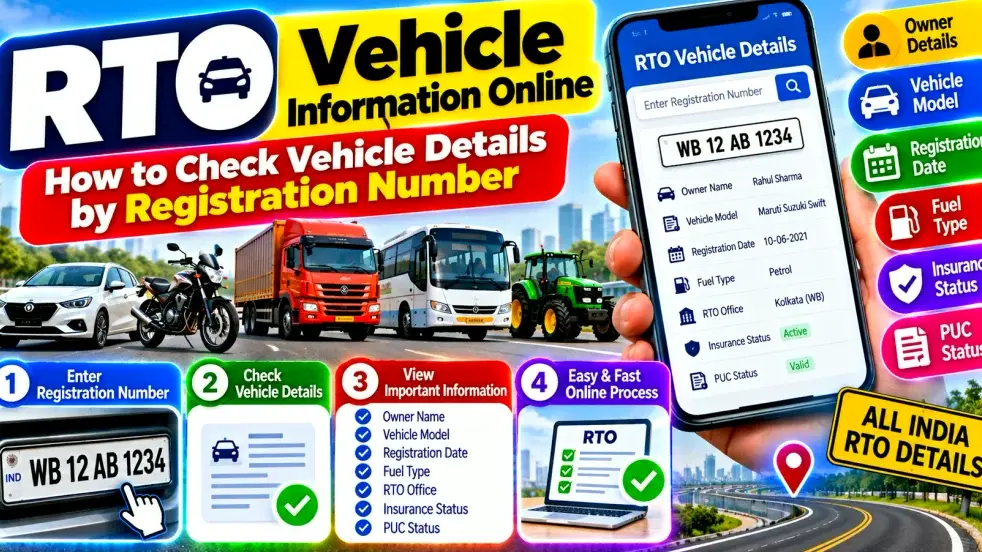
This guide explains how to check vehicle details by registration number online in India, including RC information, insurance status, PUC validity and common search problems.
RTO Vehicle Information Online – Quick Overview
| Vehicle Information | Details |
|---|---|
| Service Name | RTO Vehicle Information Online |
| Official Platform | Parivahan / VAHAN |
| Department | Ministry of Road Transport and Highways |
| Search Method | Vehicle Registration Number |
| Vehicle Category | Car, Bike and Other Registered Vehicles |
| Registration Date | Available Where Supported |
| Registering Authority | Available |
| Vehicle Class | Available |
| Fuel Type | Available |
| Insurance Validity | May Be Available |
| PUC Validity | May Be Available |
| Owner Information | Restricted or Masked |
| Access Method | Website or Supported Mobile Services |
Note: The information displayed depends on the service, available records and applicable privacy restrictions.
What Is RTO Vehicle Information?
RTO vehicle information refers to official records associated with a registered motor vehicle.
These records are maintained through transport authorities and relevant digital systems.
A vehicle registration number acts as an important reference for identifying a registered vehicle.
Online services allow users to retrieve selected information associated with that number.
However, public access is limited to information permitted under the applicable government systems.
Detailed personal information about vehicle owners is not generally available through unrestricted public searches.
What Is the VAHAN Portal?
VAHAN is a government digital platform supporting vehicle registration and related transport services in India.
It forms part of the country’s transport e-governance infrastructure.
The platform helps connect vehicle-related records and services across participating transport authorities.
Citizens can use supported services to check basic registration details and access vehicle-related applications.
The exact features may vary by state, service and user authentication requirements.
How to Check Vehicle Details by Registration Number
Users can follow these general steps:
- Visit the official Parivahan website.
- Find the Know Your Vehicle Details service.
- Open the vehicle information search page.
- Register or sign in if the service requests authentication.
- Enter the vehicle registration number.
- Complete the required CAPTCHA or verification.
- Submit the search request.
- Review the vehicle information displayed.
Some services may require mobile verification or additional authentication.
The interface and available details can change, so users should follow the instructions shown on the official portal.
How to Find the Vehicle Registration Number
The registration number is the official identification number assigned to a vehicle.
It is generally displayed on the vehicle’s registration plates and Registration Certificate.
For example, a registration number may follow a format such as WB02AB1234.
The letters and numbers identify the registration series and other relevant registration information.
When searching online, enter the complete registration number accurately.
An incorrect character can prevent the system from locating the correct record.
Check Vehicle RC Details Online
The Registration Certificate, commonly called the RC, is an important vehicle document.
It contains official registration information.
Online vehicle searches may display selected RC-related details, including registration date, vehicle class and registering authority.
However, a basic public search is not the same as obtaining a complete certified RC record.
Vehicle owners may need to use authenticated services for detailed records or document-related transactions.
Check Vehicle Insurance Validity
Vehicle insurance information is important for registered vehicle owners.
Some official vehicle information services provide available insurance-validity details.
Users can enter the registration number and review the displayed status.
However, online information may not always reflect a recently renewed policy immediately.
For confirmation, vehicle owners should check their insurer’s policy documents or contact the insurance provider.
A vehicle information search should not replace verification of the actual insurance policy.
Check PUC Certificate Status
A Pollution Under Control certificate, commonly called a PUC certificate, records compliance with applicable vehicle emission requirements.
Supported vehicle information services may display PUC validity.
Vehicle owners can use this information to identify when a certificate may require renewal.
If the displayed information appears incorrect, users should verify the record through the appropriate official service.
PUC requirements and validity periods depend on applicable rules.
Can You Check Vehicle Owner Details?
Many users search for vehicle owner information using a registration number.
Official systems may provide limited or masked ownership-related information.
However, personal information is protected by applicable privacy restrictions.
A public search should not be expected to reveal another person’s complete address, contact number or other sensitive details.
Vehicle owners may access additional information about their own records through authorized services.
Users should avoid websites claiming to reveal unrestricted private owner information.
Check Vehicle Details Before Buying a Used Car
Vehicle information searches can be useful when considering a second-hand car.
Buyers can compare the available registration details with the documents presented by the seller.
Important checks include the vehicle registration number, registration status and available insurance information.
Buyers should also verify the original RC, vehicle identification details and ownership-transfer requirements.
An online search alone cannot confirm the vehicle’s mechanical condition or guarantee a fraud-free transaction.
A professional inspection and proper documentation remain important.
Check Bike Registration Details Online
The same general vehicle-information process can be useful for motorcycles and scooters.
Users can search using the two-wheeler’s registration number.
Available information may include registration details, vehicle class and certain validity records.
The exact results depend on the official database.
Motorcycle owners should also keep their RC, insurance and applicable PUC documents updated.
RTO Vehicle Information on Mobile
Vehicle information can also be accessed through supported mobile services.
The official mParivahan ecosystem provides access to various transport-related services.
Depending on authentication and service availability, users may be able to access their own digital vehicle documents.
For reliable information, use official government platforms and authorized applications.
Avoid installing unknown APK files advertised as vehicle-information tools.
Why Vehicle Details May Not Appear
Sometimes an online vehicle search does not return the expected information.
Possible reasons include an incorrect registration number, incomplete digitization, temporary technical problems or delays in updating records.
Some records may also have restricted visibility.
Users should first verify the registration number.
If the problem continues, they can contact the relevant registering authority or official support channel.
Do not assume that a vehicle is unregistered simply because one online search fails.
Is RTO Vehicle Information Free?
Basic vehicle information services may be available without a separate search charge.
However, authentication requirements and access restrictions can apply.
Some official services, such as certified document requests or specific vehicle-related transactions, may involve prescribed fees.
Users should verify charges on the official government portal.
Avoid paying unofficial websites for information that can be checked through authorized services.
Benefits of Checking Vehicle Information Online
Online vehicle information services provide several practical advantages.
They help users review available registration records without unnecessary travel.
Vehicle owners can check selected details and identify possible discrepancies.
Used-vehicle buyers can perform preliminary document checks.
The service also helps users understand the registering authority and vehicle category.
However, online information should be treated as one part of proper vehicle verification.
Important Safety and Privacy Tips
Always use official government websites or trusted authorized applications.
Never share OTPs, passwords or sensitive account details with unknown individuals.
Avoid entering personal information on suspicious websites.
Do not use vehicle searches to obtain or misuse another person’s private information.
For ownership transfers, document corrections or other official transactions, follow the relevant transport authority’s procedures.
Frequently Asked Questions (FAQ)
1. How can I check RTO vehicle information online?
Visit the official Parivahan vehicle-information service and search using the registration number, completing any required verification.
2. Can I check vehicle details using only the registration number?
Basic searches generally begin with the registration number, although login or additional verification may be required.
3. Can I check car registration details online?
Yes. Supported official services allow users to search available car registration information.
4. Can I check bike details by registration number?
Yes. Registered motorcycles and scooters can also be searched where records are available.
5. Can I check vehicle insurance validity online?
Some official services display available insurance-validity information. Confirm important details with the insurer.
6. Can I check PUC validity online?
Supported vehicle-information services may show PUC validity information.
7. Can I find a vehicle owner’s mobile number?
No. Public vehicle searches do not provide unrestricted access to private contact information.
8. What if my vehicle details are incorrect?
Contact the relevant registering authority or use the applicable official correction procedure.
9. Is an online vehicle search useful before buying a used car?
Yes. It provides preliminary information, but buyers should also verify documents and inspect the vehicle.
10. Is the Parivahan vehicle-information service available across India?
Parivahan supports nationwide vehicle-related services, although record availability and individual features may vary.
Conclusion
RTO Vehicle Information Online provides a convenient way to check selected vehicle registration details using a registration number.
Through official Parivahan and VAHAN services, users can review available information such as registration date, vehicle class, registering authority, insurance validity and PUC status.
The service can be useful for car owners, motorcycle owners and people considering second-hand vehicle purchases.
However, publicly accessible information is limited, and sensitive ownership details are protected.
Users should understand that an online vehicle search does not replace official documents, insurance confirmation or a professional vehicle inspection.
For accurate results, enter the correct registration number and use authorized government platforms.
If records are missing or incorrect, contact the relevant transport authority.
By understanding how to check vehicle details by registration number online in India, users can review important registration information and make better-informed vehicle-related decisions.
Disclaimer: This article provides general information about vehicle registration searches in India. Available details, authentication requirements, fees and online services may change. Always verify information through official government platforms.